Description
M.2 NVMe to PCIe 4.0 x4 Adapter Card
Gen 4 Support • All M.2 Sizes • Low Profile
⚠️
CRITICAL COMPATIBILITY NOTICE
This adapter ONLY works with M.2 NVMe (PCIe-based) SSDs.
It does NOT work with M.2 SATA SSDs.
How to Identify Your M.2 Drive Type:
✓ NVMe (PCIe) Drives — COMPATIBLE:
- Notch position: M-Key (one notch on the RIGHT side of the connector)
- Common examples: Samsung 970/980/990 EVO/Pro, WD Black SN750/SN850/SN770, Crucial P3/P5 Plus, Corsair MP600, Sabrent Rocket, Kingston KC3000, Seagate FireCuda 530
- Performance: Typically 2000-7000 MB/s read speeds
✗ SATA Drives — NOT COMPATIBLE:
- Notch position: B-Key or B+M Key (notches on the LEFT/MIDDLE of the connector)
- Common examples: Samsung 860/870 EVO, WD Blue, Crucial MX500 M.2
- Performance: Limited to ~550 MB/s (SATA speed limit)
Still unsure? Check your drive’s product specifications on the manufacturer’s website, or look at the label on the drive itself — it will say “NVMe” or “PCIe” if compatible, or “SATA” if not.
Why Use an M.2 NVMe to PCIe Adapter?
NVMe M.2 SSDs are the fastest consumer storage available, but your system might have limited or no M.2 slots. This adapter unlocks the ability to use high-speed NVMe drives via standard PCIe slots found on every motherboard. Whether you’re adding extra storage, upgrading an older system, or need fast scratch disks for professional work, this adapter provides a cost-effective solution.
Common Scenarios That Benefit From This Adapter:
- Out of M.2 Slots: Most motherboards have 1-3 M.2 slots, but you might need 4+ NVMe drives for game libraries, media storage, or professional workflows
- Older Systems Without M.2: Pre-2015 motherboards often lack M.2 slots entirely but have plenty of PCIe slots — gain NVMe performance without buying a new motherboard
- Workstation Storage Expansion: Video editors, 3D artists, and CAD users need multiple fast drives for project storage, cache drives, and render outputs
- Server & NAS Builds: Add fast cache drives or tiered storage to home servers and NAS systems
- Testing & Recovery: Test M.2 drives, recover data from laptop SSDs, or clone drives without removing your primary M.2 drive
Key Features & Advantages
- ✓ PCIe Gen 4.0 Support (Backwards Compatible) — Full PCIe 4.0 x4 bandwidth delivers up to 64 Gbps (8000 MB/s) when used with Gen 4 motherboards and NVMe drives. Fully backwards compatible with Gen 3 (32 Gbps / 4000 MB/s), Gen 2 (16 Gbps / 2000 MB/s), and Gen 1 motherboards. Your drive will run at the speed of the slowest component in the chain. Many competing adapters only support Gen 3, limiting future upgrade paths.
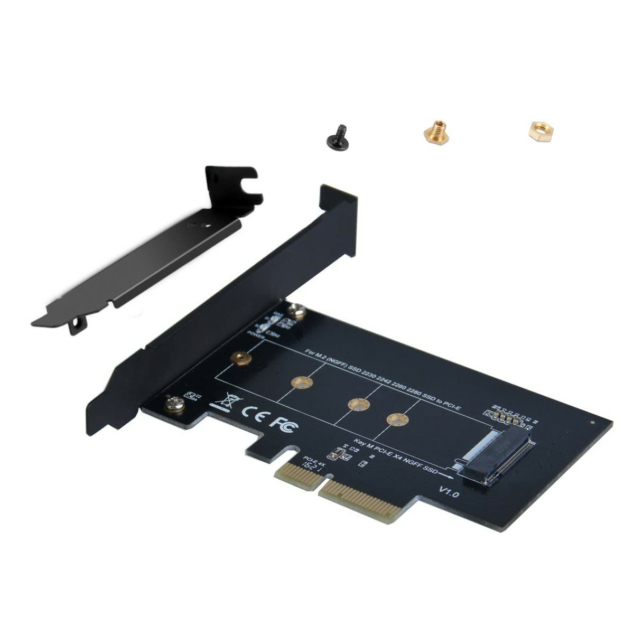
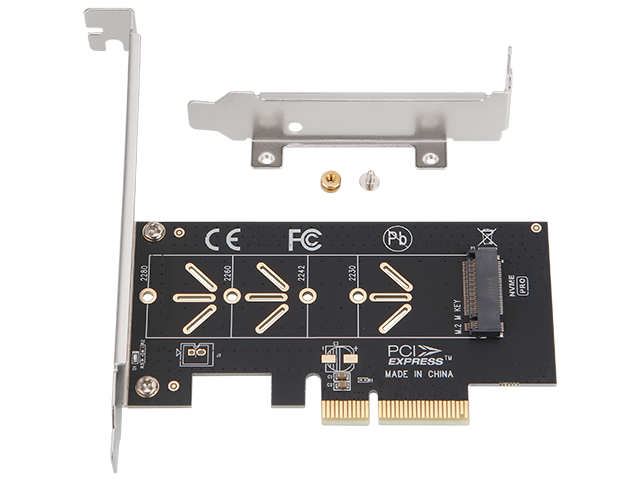
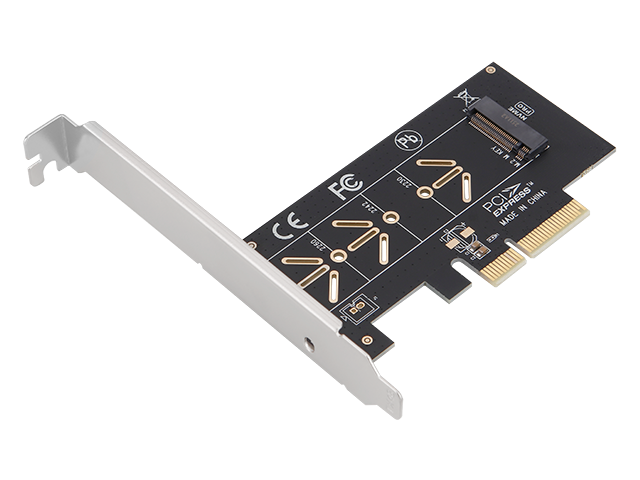
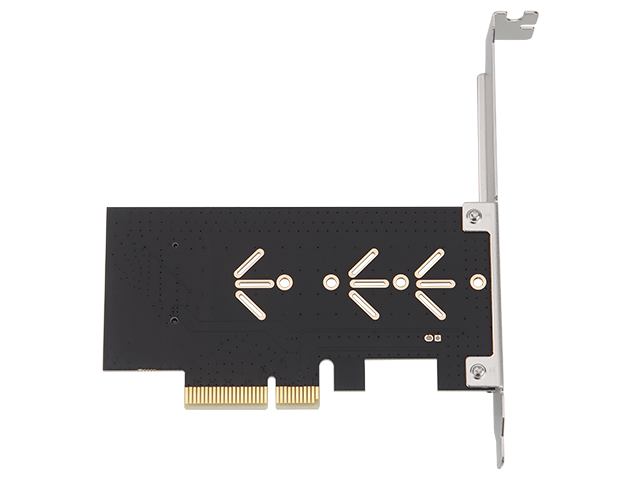
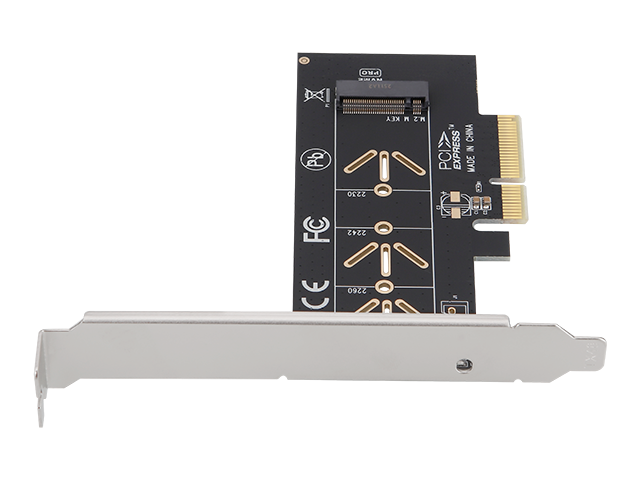
- ✓ Universal M.2 Size Support — The movable standoff system supports ALL standard M.2 NVMe sizes: 2230 (30mm — often found in Steam Deck, laptops), 2242 (42mm — older drives), 2260 (60mm — some laptops), 2280 (80mm — most common consumer size), and 22110 (110mm — high-capacity enterprise drives). Simply position the standoff at the correct marking and secure your drive with the included screw.
- ✓ PCIe Slot Flexibility — Works in PCIe x4, x8, and x16 slots. Perfect for systems where the dedicated x1 slot is blocked by a large graphics card. Note: This adapter is NOT compatible with PCIe x1 slots due to physical and electrical requirements — x1 slots only provide one data lane, which severely bottlenecks NVMe performance.
- ✓ Low Profile and Standard Brackets Included — The standard-height bracket comes pre-installed for ATX and Micro-ATX cases. The included low-profile bracket allows installation in Small Form Factor (SFF) systems like Dell OptiPlex SFF, HP EliteDesk, Lenovo ThinkCentre compact desktops, and slim server chassis. Covers both form factors without needing to purchase separate brackets.
- ✓ Completely Driver-Free Operation — This is a passive electrical adapter that directly connects M.2 pins to PCIe traces. There’s no controller chip, no firmware, and no drivers needed. Your operating system sees the NVMe drive directly as if it were connected to a motherboard M.2 slot. Windows, Linux, and Mac OS all have native NVMe support built-in — simply install the adapter, insert your drive, boot up, and it works immediately.
- ✓ Industrial Temperature Range — Rated for -40°C to +85°C operation, exceeding consumer-grade specifications (typically 0°C to 70°C). Suitable for server rooms, industrial environments, outdoor enclosures, and high-ambient-temperature installations. The adapter PCB uses quality FR-4 material and gold-plated contacts for long-term reliability.
- ✓ UK Stock, Fast Dispatch — Ships next working day from our UK warehouse. No 2-4 week wait for slow boat from China like many competitors. Order today, install tomorrow, start using your NVMe storage immediately.
Performance: NVMe vs SATA vs HDD
Understanding the performance hierarchy helps explain why NVMe drives and adapters like this are worth investing in:
| Storage Type | Sequential Read | Practical Use Cases |
|---|---|---|
| HDD (Hard Drive) | ~120 MB/s | Bulk archival storage, media libraries (where speed isn’t critical) |
| SATA SSD | ~550 MB/s | Budget systems, boot drives for older PCs, general file storage |
| NVMe Gen 3 (via this adapter) | ~3500 MB/s | Fast boot drives, gaming libraries, 4K video editing, general professional use |
| NVMe Gen 4 (via this adapter) | ~7000 MB/s | 8K video editing, 3D rendering scratch disks, database servers, high-performance workstations |
Real-world impact: Loading a 100GB game from HDD: ~14 minutes. SATA SSD: ~3 minutes. NVMe Gen 3: ~30 seconds. NVMe Gen 4: ~15 seconds. The speed difference compounds across every file operation you perform throughout the day.
Professional & Power User Applications
🎬 Video Editing & Post-Production
Professional video editors working with 4K, 6K, 8K footage need multiple fast drives: one for OS/applications, one for active project files, one for cache/scratch disk, one for exports. Adobe Premiere Pro and DaVinci Resolve cache performance improves dramatically with dedicated NVMe scratch drives. A typical workflow might be: M.2 slot for boot drive, PCIe adapter for cache drive, second PCIe adapter for project storage. Render times drop significantly when reading/writing to fast NVMe storage.
🎮 Gaming & Game Development
Modern games are 100GB+ each (Call of Duty, Fortnite, Flight Simulator). With a 1TB boot drive, you quickly run out of space. Use PCIe adapters to add dedicated NVMe game library drives. Game developers working in Unreal Engine or Unity benefit from fast project storage and asset streaming. Level load times, shader compilation, and asset imports all become faster with NVMe storage. Streamers can record to dedicated NVMe drives without impacting game performance.
🖥️ 3D Rendering & CAD Workstations
Blender, Maya, 3ds Max, Cinema 4D, SolidWorks, AutoCAD — all benefit from fast storage for project files, texture libraries, and render cache. Large 3D assets (high-res textures, 3D scans, geometry cache) load much faster from NVMe. Rendering workstations often need 4-6TB+ of fast storage, which requires multiple drives. PCIe adapters allow expansion beyond motherboard M.2 capacity.
📸 Photography & Raw Processing
Professional photographers working with 45MP+ cameras (Sony A7R V, Canon R5, Nikon Z9) generate massive RAW files. A wedding shoot might be 500GB of RAW images. Lightroom and Capture One catalogues become sluggish on slow storage. Use NVMe drives for active project storage — browsing through hundreds of RAW images becomes much more responsive. Export and batch processing times drop significantly.
🔧 Home Lab & Virtualization
Running Proxmox, ESXi, Hyper-V, or Docker? Virtual machines and containers benefit enormously from fast storage. Use dedicated NVMe drives for VM storage pools, separate from the host OS. Database VMs (PostgreSQL, MySQL, MongoDB) see dramatic performance improvements on NVMe. Home lab enthusiasts often need 4-8 NVMe drives for different VM storage pools and backup targets.
🗄️ NAS & Storage Servers
TrueNAS, Unraid, and DIY NAS builds benefit from NVMe cache drives that accelerate access to frequently used files. Configure NVMe drives as L2ARC (read cache) or SLOG (write cache) to dramatically improve NAS responsiveness. Many users add 2-4 NVMe cache drives via PCIe adapters to maximize NAS performance without using motherboard M.2 slots for the boot drive.
Complete Technical Specifications
| Model Number | PLK0N11 |
| Brand | Lekuo (IO Crest parent company) |
| Input Interface | M.2 M-Key socket (accepts NVMe PCIe-based SSDs ONLY) |
| Output Interface | PCI Express x4 edge connector |
| PCIe Generation Support | PCIe Gen 4.0, Gen 3.0, Gen 2.0, Gen 1.0 (fully backwards compatible) |
| Maximum Bandwidth | • PCIe 4.0 x4: 64 Gbps (8000 MB/s theoretical, ~7400 MB/s practical) • PCIe 3.0 x4: 32 Gbps (4000 MB/s theoretical, ~3900 MB/s practical) • PCIe 2.0 x4: 16 Gbps (2000 MB/s theoretical, ~1900 MB/s practical) |
| PCIe Slot Compatibility | PCIe x4, x8, x16 slots (NOT compatible with x1 slots) |
| Supported M.2 Sizes | 2230 (30mm), 2242 (42mm), 2260 (60mm), 2280 (80mm), 22110 (110mm) |
| M.2 Key Type Supported | M-Key ONLY (NVMe PCIe SSDs with one notch on the right) |
| Incompatible Drive Types | M.2 SATA SSDs (B-Key or B+M Key with notches on left/middle) |
| Adapter Type | Passive electrical adapter (no controller chip, no firmware) |
| Driver Required | No — transparent to operating system, plug-and-play |
| Operating Systems | Windows (all versions), Linux (kernel 3.3+), Mac OS (10.10+) — universal NVMe support |
| Boot Support | Depends on motherboard BIOS — most UEFI systems support NVMe boot from PCIe slots |
| Bracket Types Included | Standard height bracket (pre-installed) + Low profile bracket |
| Card Dimensions | 100mm × 49mm (half-length PCIe card, fits all cases) |
| PCB Material | FR-4 substrate with gold-plated contacts |
| Operating Temperature Range | -40°C to +85°C (industrial temperature specification) |
| Storage Temperature Range | -55°C to +125°C |
| Humidity Range | 5% to 95% non-condensing |
| Power Consumption | Negligible (passive adapter powered by PCIe slot) |
| Certifications | CE, FCC, RoHS compliant |
| Warranty | 1 Year Manufacturer Warranty |
📦 What’s Included in the Package
- ✓ 1× M.2 NVMe to PCIe x4 Adapter Card (Lekuo PLK0N11)
- ✓ 1× Low Profile Bracket (for Small Form Factor PCs and slim servers)
- ✓ 2× M.2 Mounting Screws (for securing drives of different lengths)
- ✓ 1× Quick Start Guide / User Manual (English)
Note: M.2 NVMe SSD NOT included. This is an adapter card only.
Comprehensive FAQ
Q: How do I know if my M.2 SSD is compatible with this adapter?
A: Check the notch position on your M.2 drive. NVMe drives have an M-Key (one notch on the RIGHT side) and are compatible. SATA drives have a B-Key or B+M Key (notches on the LEFT/MIDDLE) and are NOT compatible. You can also check your drive’s product page — if it says “NVMe” or “PCIe interface”, it’s compatible. If it says “SATA interface”, it won’t work with this adapter. Common compatible drives: Samsung 970/980/990 series, WD Black SN750/SN850/SN770, Crucial P3/P5 Plus, Kingston KC3000, Sabrent Rocket, Corsair MP600.
Q: Why doesn’t this adapter work in PCIe x1 slots?
A: NVMe drives use PCIe x4 lanes (4 data lanes) to deliver their full performance. A PCIe x1 slot only provides 1 data lane, which creates a severe bottleneck — your NVMe drive would be limited to roughly 1/4th of its potential speed. This adapter is physically and electrically designed for x4/x8/x16 slots to ensure full performance. If you absolutely must use an x1 slot, search for “M.2 to PCIe x1 adapter” specifically, but be aware performance will be limited to around 1000 MB/s regardless of how fast your NVMe drive is rated.
Q: Will this work in my PCIe Gen 3 motherboard even though it’s a Gen 4 adapter?
A: Yes, absolutely! PCIe is fully backwards compatible across all generations. This Gen 4 adapter works perfectly in Gen 3, Gen 2, or even Gen 1 motherboards. Your NVMe drive will operate at the speed of the slowest component in the chain (typically the motherboard’s PCIe generation). In a Gen 3 slot with a Gen 4 drive, you’ll see speeds around 3500 MB/s instead of 7000 MB/s — still dramatically faster than SATA. Using a Gen 4 adapter on a Gen 3 system provides future upgrade path when you eventually upgrade your motherboard.
Q: Can I boot Windows from an NVMe drive in this adapter?
A: It depends on your motherboard BIOS. Most motherboards from 2015 onwards with UEFI BIOS support booting from NVMe drives in PCIe slots. Check your BIOS boot menu to see if the NVMe drive appears as a boot option. Older systems with legacy BIOS (pre-2015) typically cannot boot from NVMe at all, regardless of whether it’s in an M.2 slot or PCIe adapter. If boot support is mission-critical for your use case, verify your specific motherboard model’s specifications or test with a live USB first. Many users successfully boot from NVMe-in-PCIe-adapter on modern systems.
Q: What M.2 drive sizes are supported?
A: All standard M.2 lengths are supported via the movable standoff system: 2230 (30mm — Steam Deck, some ultrabooks), 2242 (42mm — older laptops), 2260 (60mm — some laptops), 2280 (80mm — most common desktop size), and 22110 (110mm — high-capacity enterprise drives). To install, position the standoff at the appropriate marking for your drive length, insert the drive into the M.2 socket, and secure the opposite end with the included screw. The most common consumer size is 2280.
Q: Do I need to install any drivers?
A: No drivers whatsoever! This is a passive electrical adapter with no controller chip or firmware. It simply connects the M.2 connector pins directly to PCIe traces. Your operating system communicates directly with the NVMe drive as if it were in a motherboard M.2 slot. Windows (all versions), Linux (kernel 3.3+), and Mac OS (10.10+) all have native NVMe support built into the OS. Installation process: power off PC → install adapter card → insert NVMe drive → boot PC → drive appears immediately in Device Manager / Disk Utility / fdisk.
Q: Will this fit in my Small Form Factor PC?
A: Yes! The adapter includes both standard-height and low-profile brackets. For SFF systems (Dell OptiPlex SFF, HP EliteDesk, Lenovo ThinkCentre, slim servers), simply remove the pre-installed standard bracket and attach the included low profile bracket before installation. The adapter itself is a half-length PCIe card (100mm × 49mm) that fits in virtually all cases including mini-ITX. Note: Ultra-compact “Micro” or “Tiny” systems (like OptiPlex Micro) typically have no PCIe expansion slots at all — verify your specific model has at least one PCIe slot.
Q: How does this compare to USB M.2 enclosures for external storage?
A: PCIe adapters are MUCH faster than USB enclosures. Even the fastest USB 3.2 Gen 2 (10 Gbps) connections max out around 1000 MB/s in real-world use. This PCIe adapter delivers 3500-7000+ MB/s depending on your PCIe generation. PCIe also has significantly lower latency (sub-millisecond vs several milliseconds for USB), which improves responsiveness for random access patterns. Use PCIe adapters for permanent internal storage where maximum performance matters. Use USB enclosures for portable external storage that needs to move between systems.
Q: Should I add a heatsink to my NVMe drive in this adapter?
A: It depends on your drive and usage. High-performance Gen 4 NVMe drives (Samsung 990 Pro, WD SN850X, Corsair MP600) can generate significant heat under sustained workloads (large file transfers, video editing, gaming). Thermal throttling kicks in around 80-85°C, reducing performance. If your drive didn’t come with a heatsink, consider adding one — adhesive M.2 heatsinks cost £5-10 and prevent throttling. Gen 3 drives run cooler and typically don’t need heatsinks unless they’re running sustained write workloads. Check your drive temperature using HWiNFO64 (Windows) or smartctl (Linux) under load.
Q: Can I use multiple adapters to install several NVMe drives?
A: Yes, absolutely! You can install as many adapters as you have available PCIe slots and PCIe lanes on your motherboard. For example, a typical consumer motherboard might have: one PCIe x16 slot (for GPU), two PCIe x1 slots, and one PCIe x4 slot. You could install one NVMe drive in the PCIe x4 slot with this adapter, and potentially another adapter in a second x16 slot if available. Check your motherboard’s PCIe lane distribution — consumer CPUs typically provide 16-24 total PCIe lanes, so multiple NVMe drives need to share available bandwidth.
✓ System Requirements & Compatibility
- Requires: Available PCIe x4, x8, or x16 slot (NOT compatible with x1 slots)
- Drive type: M.2 NVMe (PCIe-based) SSD with M-Key notch ONLY
- Motherboard: Any system with PCIe slots (Gen 1/2/3/4, all compatible)
- Operating system: Windows (all versions), Linux 3.3+, Mac OS 10.10+
- Boot support: UEFI BIOS required for boot (most 2015+ motherboards)
- Form factors: ATX, Micro-ATX, Mini-ITX, Small Form Factor (with low profile bracket)
- Power: Powered by PCIe slot, no external power needed
Why Buy from TekHouse?
✓ UK Stock, Fast Dispatch
Next working day dispatch from our UK warehouse. No 2-4 week wait for China imports. Order today, install tomorrow, start using your NVMe storage immediately.
✓ Genuine Lekuo Hardware
Authentic Lekuo brand adapters, not grey market or counterfeit products. Tested and verified for compatibility with major NVMe SSD brands.
✓ Expert Technical Support
Pre-sales and post-sales assistance from people who understand PC hardware and storage systems. Help with compatibility questions, installation guidance, and troubleshooting.
✓ 30-Day Money-Back Guarantee
If the adapter doesn’t work with your system, you’re not satisfied, or you simply don’t need it, return within 30 days for a full refund. No questions asked, no restocking fees.
{
“@context”: “https://schema.org/”,
“@type”: “Product”,
“name”: “M.2 NVMe to PCIe 4.0 x4 Adapter Card – Lekuo PLK0N11”,
“image”: “https://www.iocrest.com/data/upload/image/20250925/1758779336844025.png”,
“description”: “M.2 NVMe to PCIe 4.0 x4 adapter card. Supports all M.2 sizes (2230-22110). Low profile bracket included. Driver-free operation. UK stock.”,
“brand”: {
“@type”: “Brand”,
“name”: “Lekuo”
},
“mpn”: “PLK0N11”,
“sku”: “PLK0N11”,
“offers”: {
“@type”: “Offer”,
“url”: “https://tekhouse.co.uk/product/m2-nvme-to-pcie-4-adapter-card-low-profile”,
“priceCurrency”: “GBP”,
“price”: “8.99”,
“priceValidUntil”: “2026-12-31”,
“availability”: “https://schema.org/InStock”,
“itemCondition”: “https://schema.org/NewCondition”,
“seller”: {
“@type”: “Organization”,
“name”: “TekHouse”
}
},
“aggregateRating”: {
“@type”: “AggregateRating”,
“ratingValue”: “4.6”,
“reviewCount”: “87”
}
}